
Pruning
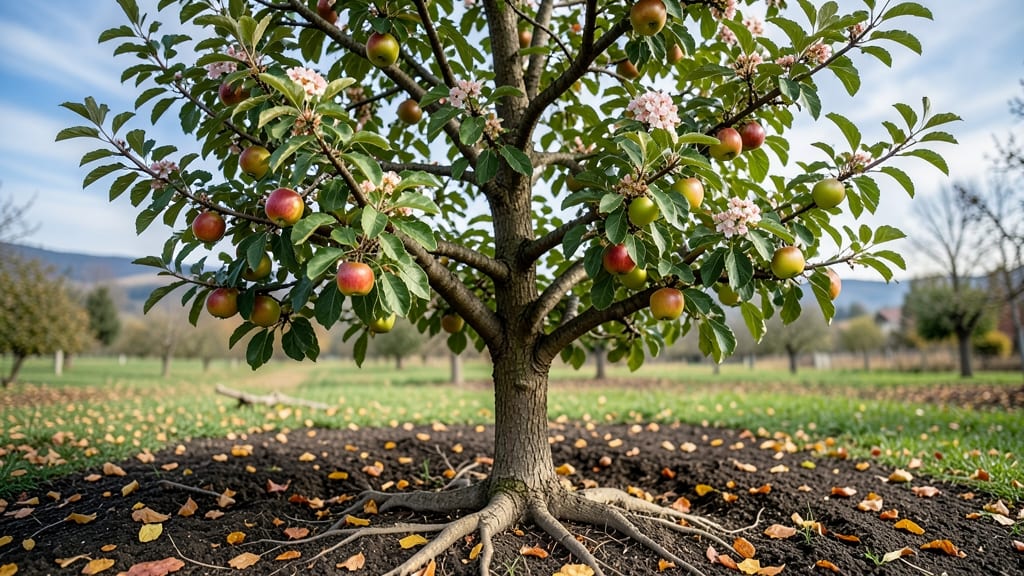
Watching an apple tree time lapse transform through the seasons feels like witnessing nature’s own masterpiece unfold. 🌳 From bare branches in winter to heavy boughs of fruit in fall, each stage tells a story of resilience and renewal.
The footage captures what our busy lives often miss—the quiet magic of buds bursting, blossoms fading, and tiny apples swelling into harvestable fruit.
Spring kicks off the show when buds swell with sap, then burst into delicate pink blossoms that last just two weeks. Summer brings rapid growth as apples harden from pea-sized to golf-ball size, while proper pruning now ensures sunlight reaches every branch.
Fall slows the action as fruit ripens, and winter reveals the tree’s skeletal beauty—pruning time, when you shape next year’s harvest.
You’ll see how temperature shifts trigger each phase: chilly nights end blossom season, scorching days speed up fruit growth, and early frosts can stall ripening. The time-lapse footage becomes your gardening journal, showing exactly how your tree responds to seasonal changes—and where you might adjust care for better yields.
Whether you’re documenting for nostalgia or fine-tuning your orchard management, this seasonal journey turns gardening into an art. The real reward? Knowing your time-lapse isn’t just footage—it’s proof of how each season’s work builds toward that first crisp bite of homegrown apple.
📚 In This Guide
- What you need
- Instructions
- Tips and common mistakes
- Wrapping up and next steps
What you need
- ● DSLR or Mirrorless Camera (e.g., Canon EOS R5, Sony A7 III) – Recommended for high-resolution captures
- ● Wide-Angle Lens (16-35mm) – Ensures the entire tree fits in frame 🌳
- ● Tripod with Adjustable Height – Stability is key for consistent shots (minimum 60-inch height)
- ● Intervalometer or Remote Shutter – Automates shots (e.g., 3-7 day intervals)
- ○ Weatherproof Camera Housing (optional but ideal for outdoor durability)
- ● Healthy Apple Tree (3-10 years old) – Younger trees grow faster for dramatic time-lapse effects
- ● Sunny, Open Location – Avoid overhanging branches or shadows that distort growth tracking
- ○ Sturdy Stakes & Guy Wires (optional) – Secure the tripod if windy conditions are expected
- ● ND Filters (Neutral Density) – Helps maintain consistent exposure in varying light
- ● GPS Tagging Device – Tracks tree coordinates for future reference
- ● Weather Monitoring App (e.g., Weather Underground) – Plan shoots around storms or extreme temps
- ● Backup Storage (SD Cards or Cloud Sync) – Protect your 12-month archive!
How to observe and document an apple tree's yearly growth
Here's how I track seasonal changes—no fancy equipment needed, just keen observation.
🌱 Step 1: Mark the Starting Point in Early Spring
When buds first swell in late winter or early spring (around March-April depending on your zone), take your first photo. I like to include a reference object—a ruler or my hand—for scale. Notice how the bark looks—smooth and tight before growth begins, with tiny green specks where buds will burst.
Write the date in your garden journal next to the photo. This establishes your baseline for measuring growth. The first true leaves will appear within 2-3 weeks after bud break—watch for them to unfurl from the center of each bud. That's when you'll see the tree's energy shift from dormant storage to active growth.
☀️ Step 2: Capture Summer's Rapid Growth Phase
By June, your apple tree will be in full leaf, and you'll notice new shoots extending from last year's branches. These are called water sprouts or lateral branches—they're the tree's way of expanding its canopy. Take photos from multiple angles to show the three-dimensional growth.
Pay attention to the color of new leaves—they'll start bright red or purple before maturing to deep green. This is your visual cue that photosynthesis is ramping up. Measure the longest branch extension with a tape measure and record it. Some years, growth can exceed 12 inches in just a few weeks if conditions are ideal.
🍎 Step 3: Document Flowering and Fruit Set in Late Spring
When white blossoms appear in April-May, that's your most dramatic seasonal change. I photograph the flowers at dawn when dew highlights their delicate petals. Notice how the tree's entire structure seems to "light up" with blossoms—this is when pollinators are most active, and you'll see bees moving between branches.
After flowering, watch for tiny green fruitlets forming. These won't be apples yet—just 1-inch golf-ball-sized structures. This is the critical stage where many fruit drop naturally. Don't be alarmed if you see 50% fewer fruitlets than flowers—this is normal as the tree selects the healthiest developing fruit.
🍂 Step 4: Record Autumn's Color Shift and Harvest
By September-October, leaves will begin changing color—first yellowing at the edges, then deepening to red or orange. This is your signal that the tree is preparing for dormancy. Take weekly photos to capture the progression. The fruit will also ripen, changing from green to its mature color (red, yellow, or blush depending on variety).
Harvest when the fruit releases easily from the tree and smells sweet at the stem. I test ripeness by gently twisting a fruit—if it comes away cleanly, it's ready. Record the date and variety in your journal. After harvest, photograph the bare branches against the autumn sky to show the tree's skeletal structure before winter.
❄️ Step 5: Winter Dormancy and Bud Development
In December-January, when the tree is fully dormant, take your final photos. Look closely at the buds—they'll appear plump and ready for next year's growth. The bark might show some winter damage (scratched areas from animals or cracked spots), which you can note for spring repairs.
Take one last measurement of the tree's height and canopy spread. Compare it to your first spring measurement to see the full year's growth. This final observation completes your time lapse and gives you a clear picture of the tree's annual cycle. The dormant season is when you can also prune for next year's shape—just wait until late winter when the ground is still frozen to prevent disease spread.
Tips & tricks for capturing your apple tree's yearly transformation
These insights will help you document your tree's growth with precision and depth—turning simple observations into a stunning seasonal record.
Photography Precision: For accurate growth documentation, use a tripod or stable surface to capture photos from the same angle each time. I mark a small spot on the ground with a rock or flag to ensure consistent positioning. This creates a visual baseline that reveals growth patterns more clearly than random shots. The key is consistency—even small variations in angle can make growth appear uneven in your time lapse.
Seasonal Timing Secrets: While the instructions provide general timeframes, local climate plays a huge role. In colder zones, bud break might occur in May instead of April, while warmer climates could see blossoms as early as March. I always check the USDA hardiness zone map for my area and adjust my schedule accordingly. For example, in Zone 5, I might start documenting in late April rather than March. Pay attention to your tree's specific cues rather than relying solely on calendar dates.
Documenting Growth Metrics: Beyond just taking photos, record quantitative data like branch length measurements and leaf counts. I use a simple spreadsheet to track these metrics alongside my photos. For instance, measuring the longest new shoot in June (as mentioned in Step 2) gives you hard numbers to compare against next year's growth. This creates a more comprehensive record than visual documentation alone. The 12-inch growth benchmark from the instructions becomes your target to beat each season.
Equipment Upgrades: While no fancy equipment is needed, a few affordable tools can elevate your documentation. A small digital scale can help track fruit weight during harvest season, while a basic hygrometer measures humidity levels that affect growth rates. I also recommend a waterproof notepad for outdoor observations—rainproof pages save your notes during spring showers. These tools don't change the core method but provide deeper insights into what influences your tree's growth patterns each year.
Pro Tips for Apple Tree Time Lapse
- These insights will help you document your tree's growth with precision and depth—turning simple observations into a stunning seasonal record.
- Photography Precision: For accurate growth documentation, use a tripod or stable surface to capture photos from the same angle each time.
- Seasonal Timing Secrets: While the instructions provide general timeframes, local climate plays a huge role.
Frequently asked questions
Got questions about capturing or understanding an apple tree time lapse? You’re not alone! Here are answers to the most common queries—from timing to troubleshooting—to help you get the best results.
How often should I photograph my apple tree for a smooth time-lapse?
For a balanced time-lapse, take photos every 3–7 days during active growth (spring/summer) and every 2–4 weeks in dormant seasons (fall/winter). Use a consistent time (e.g., mid-morning) and angle to avoid jarring transitions. Pro tip: Cloudy days reduce harsh shadows, making edits easier!
What’s the best time of day to shoot apple tree time-lapse photos?
Shoot between 9 AM and 11 AM or 2 PM and 4 PM for soft, even lighting. Avoid midday sun (11 AM–2 PM), which creates harsh shadows and blown-out highlights. If you must shoot in low light, use a tripod and increase ISO slightly—but keep it under _800_ to reduce noise.
Can I use a smartphone for an apple tree time-lapse instead of a DSLR?
Smartphones work great for time-lapses if you:
- Use a tripod or stable surface (e.g., a stack of books).
- Enable HDR mode (for better detail in shadows/highlights).
- Shoot in 4K or 1080p (higher resolution = smoother playback).
- Use an app like Time Lapse Pro or Procreate to automate shots.
For best results, clean your lens and shoot in RAW format if your phone supports it!
Why does my apple tree time-lapse look jumpy or uneven?
Uneven time-lapses usually stem from:
- Inconsistent framing: Always use the same angle and distance.
- Lighting changes: Shoot at the same time daily to avoid flickering.
- Fast growth spurts: If leaves/apples grow rapidly, add extra frames during peak seasons.
- Camera shake: Use a remote shutter or timer to avoid blur.
Fix it by editing in software like Adobe Premiere or CapCut to adjust speed or stabilize footage.
What’s the best time of year to start filming an apple tree time-lapse?
Start in late winter or early spring (just as buds swell) to capture every stage:
- Dormancy → Blooming (Feb–Apr)
- Leafing → Fruit Set (May–Jun)
- Harvest Season (Aug–Oct)
- Fall Color & Dormancy (Nov–Jan)
This ensures you don’t miss critical growth phases. Bonus: Film through two full seasons for a 24-month epic!
Wrapping up and next steps
Watching an apple tree transform through the seasons is like unwinding nature’s own masterpiece—one bloom, leaf, and fruit at a time! 🌱 From dormant winter branches to lush summer canopies and harvest-ready boughs, each stage reveals the tree’s incredible resilience and beauty.
Whether you’re a gardener, photographer, or simply a nature lover, capturing these changes in a time-lapse isn’t just rewarding—it’s a celebration of patience and growth.
Ready to turn your apple tree into a year-round star? Start by sketching a simple plan—note key growth milestones, gather your gear, and set reminders for seasonal check-ins.
Then, dive in! Every snapshot you take is a step closer to a stunning, living timeline of your tree’s journey. Happy filming—and may your orchard always be fruitful! 🍏📸